

AvinaSignals__c) inside your Salesforce org every time a signal fires. This custom object stores all signal data in a structured format that you can use for reporting, automation, and workflows.
Each record contains:
| Section | Details |
|---|---|
| Human-readable sentence | A short, plain-English summary of the signal (see example below). |
| Tag line | One or more lowercase “snake-case” tags that classify the signal. These tags power Salesforce reports, flows, and lists. |
| Related records | Automatic lookup relationships to relevant Account, Contact, and Opportunity records when available. |
Signal Summary: Avina Alert: Dev Security hired Brandon Riley as their new Chief Revenue Officer. He joined the company in Feb 2025 and is based in Ann Arbor, Michigan, United States.
Tags: avina_new_hire_signal
Setup Guide
Before Avina can push signals to your Salesforce org, you’ll need to create the Avina Signals custom object that will store the signal data.Creating the Custom Object
- Download the object definition: Download CSV file that defines the custom object attributes.
- Navigate to Object Manager: In your Salesforce org, go to Setup → Object Manager.
- Create Object from Spreadsheet: Click Create and then select Create Object from Spreadsheet.
-
Upload the CSV: Upload the downloaded CSV file to create the
AvinaSignals__ccustom object. - Complete the import: Add the CSV to the import list. If you encounter any issues, try using an incognito/private browser window.
- Find your new object: Go back to Object Manager and locate your newly created Avina Signals object.
- Create Account lookup field: Click into the Avina Signals object, then click New to create a new field. Select Lookup as the field type, choose Account as the related object, then click Next through the setup process and Save.
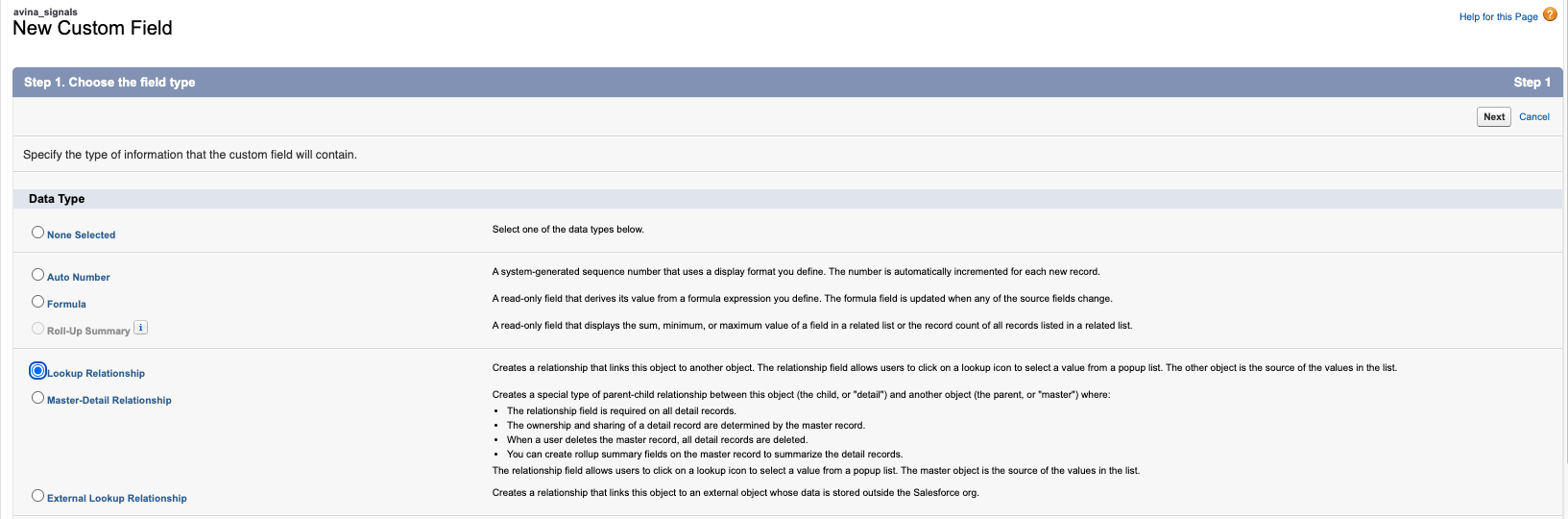
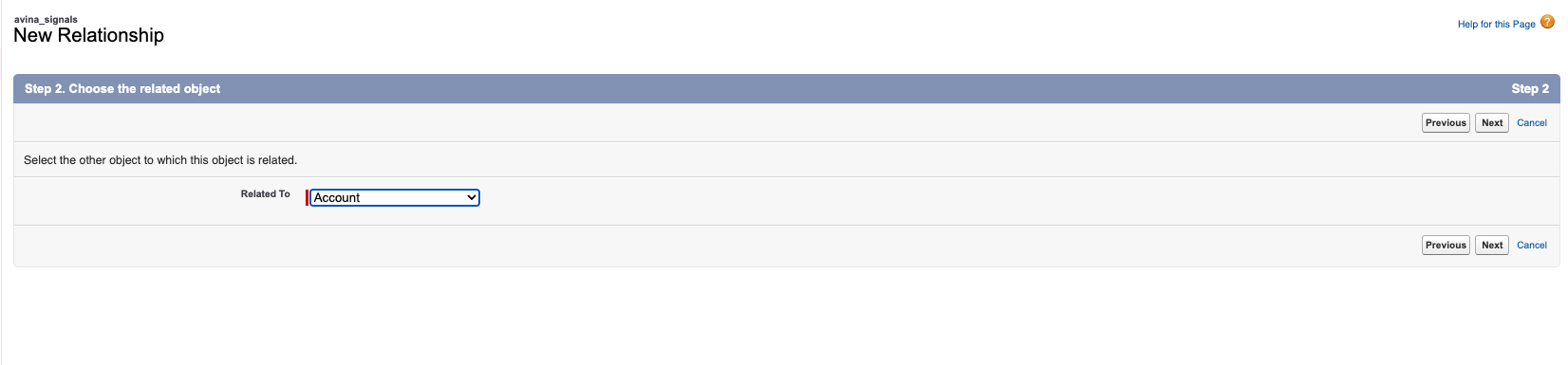
- Create Contact lookup field: Repeat step 7, but this time select Contact as the related object for the lookup field.
- (Optional) Create Lead lookup field: Repeat step 7, but this time select Lead as the related object for the lookup field.
- Enable push settings for Salesforce: Go to Settings → Integrations in the Avina dashboard. Select the Salesforce connector and enable Push resolved contacts to Salesforce, Push ICP contacts to Salesforce, and Push signals to account and contact activity.
- All done! Once complete, Avina will start creating records in your Avina Signals custom object with proper relationships to Account and Contact records as signals are created.
Tag reference
| Signal | Tag(s) Avina writes |
|---|---|
| Re-engagement Signal | avina_reengagement_signal |
| Outbound Signal | avina_outbound_signal |
| Champion Movement Signal | avina_champion_movement_signal |
| New Hire Signal | avina_new_hire_signal |
| Social Activity Signal | avina_social_activity_signal |
| Job Posting Signal (Account-level) | avina_job_posting_signal |
| General Engagement Signal | avina_general_engagement_signal |
| Web Visit | avina_web_visit_signal |
| Marketing Email | avina_marketing_email_signal |
| Ad Engagement | avina_ad_engagement_signal |
| Ad Impression | avina_ad_impression_signal |
| Other / Misc. | avina_other_signal (plus context tags) |
Tip: Some signals carry multiple tags. E.g., a Champion visiting the site will include bothavina_web_visit_signalandavina_champion_movement_signal.
Triggering automations with Salesforce Flow Builder
| Goal | High-level steps |
|---|---|
| Slack / email alert to AE when a new CRO is hired | Object: Avina Signals → Trigger: A record is created.Entry Condition: Tags CONTAINS 'avina_new_hire_signal'.Action: Send Slack notification or Email Alert. |
| Auto-create follow-up Task on champion movement | Same trigger with tag avina_champion_movement_signal; Action: Create Task assigned to related Account Owner. |
| Add Account to Outreach sequence when job listings spike | Trigger on avina_job_posting_signal; Action: call Outreach API via Flow → Add Prospect to Sequence. |
Example use-cases
| Use-case | How to set it up in Salesforce |
|---|---|
| Nurture new champions | Report on avina_champion_movement_signal → Campaign → Pardot/Marketing Cloud |
| AE alert: prospect gets new CRO | Flow Builder on avina_new_hire_signal → Campaign → Outreach |
| Ad retargeting for recent web visitors | Report on avina_web_visit_signal → Audience list in Advertising Studio |
| Upsell play when job listings spike | Flow on avina_job_posting_signal → update custom Upsell Probability field |
Best practices & FAQs
| Question | Answer |
|---|---|
| Why a custom object instead of Tasks? | Custom objects provide more flexibility for storing signal-specific data and enable better reporting and automation capabilities. |
| How fast do records appear? | Near real-time. Most users see signal records within < 2 minutes of the triggering event. |
| Can I customize the object structure? | The initial setup uses a standardized structure for consistency. Contact support for advanced customization needs. |